Pmax Industrial Automation
  • Home
  • Automation & Drives
    • PLC
    • HMI
    • Drives
  • Industry
    • Strip Processing Lines
    • Bar Rolling Mills
    • Molding Lines
  • Contact

Online Monitoring of Functions and Function Blocks in Siemens Step 7

3/3/2016

0 Comments

 
Step 1
In the FC that is calling FB or FC of that you want to monitor, select Debug>Operation
Picture
Step 2 
Select Test Operation and click OK​
Picture
Step 3
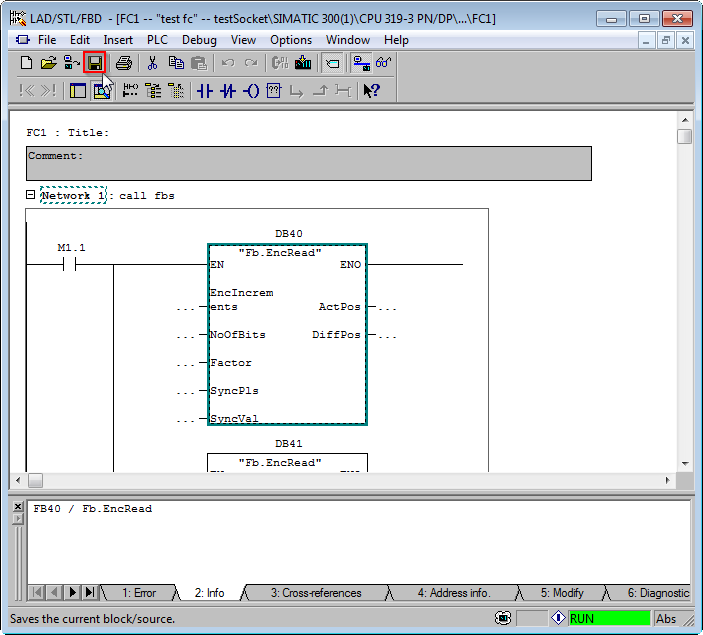
​Save the FC
​
Picture
Step 4 
And Download it
Picture
Step 5
When you right click on FB or FC, a new context menu line will be present - Monitor with Call-Up Paht.
Picture
Picture
0 Comments

Your comment will be posted after it is approved.


Leave a Reply.

    Categories

    All
    ONLINE MONITORING OF FUNCTION BLOCKS IN SIEMENS STEP 7
    Step7

    RSS Feed

We are based in Luxembourg, but we provide our services worldwide.

​​Pmax G​mbH
​6, Val Saint André
L-1128 Luxembourg
Picture

    STAY IN TOUCH WITH US

Submit
©2015-2021  |   Pmax GmbH   |   All rights reserved